
Symptoms
A PDF attachment prints with missing text, invalid characters, or unexpected fonts, even though it looks fine in Adobe Acrobat or Foxit Reader.
Cause
The PDF file is not fully compliant with the PDF standard, often because of an error in the file header. Some PDF readers tolerate this, but the built-in PDF engine of Automatic Email Manager is stricter.
Tip: To check a file, use a free online validator such as PDF Online Validator.
Solution 1: Ask the sender to fix the PDF
Ask the sender to update their PDF generator or use another one.
Solution 2: Print with an external PDF reader
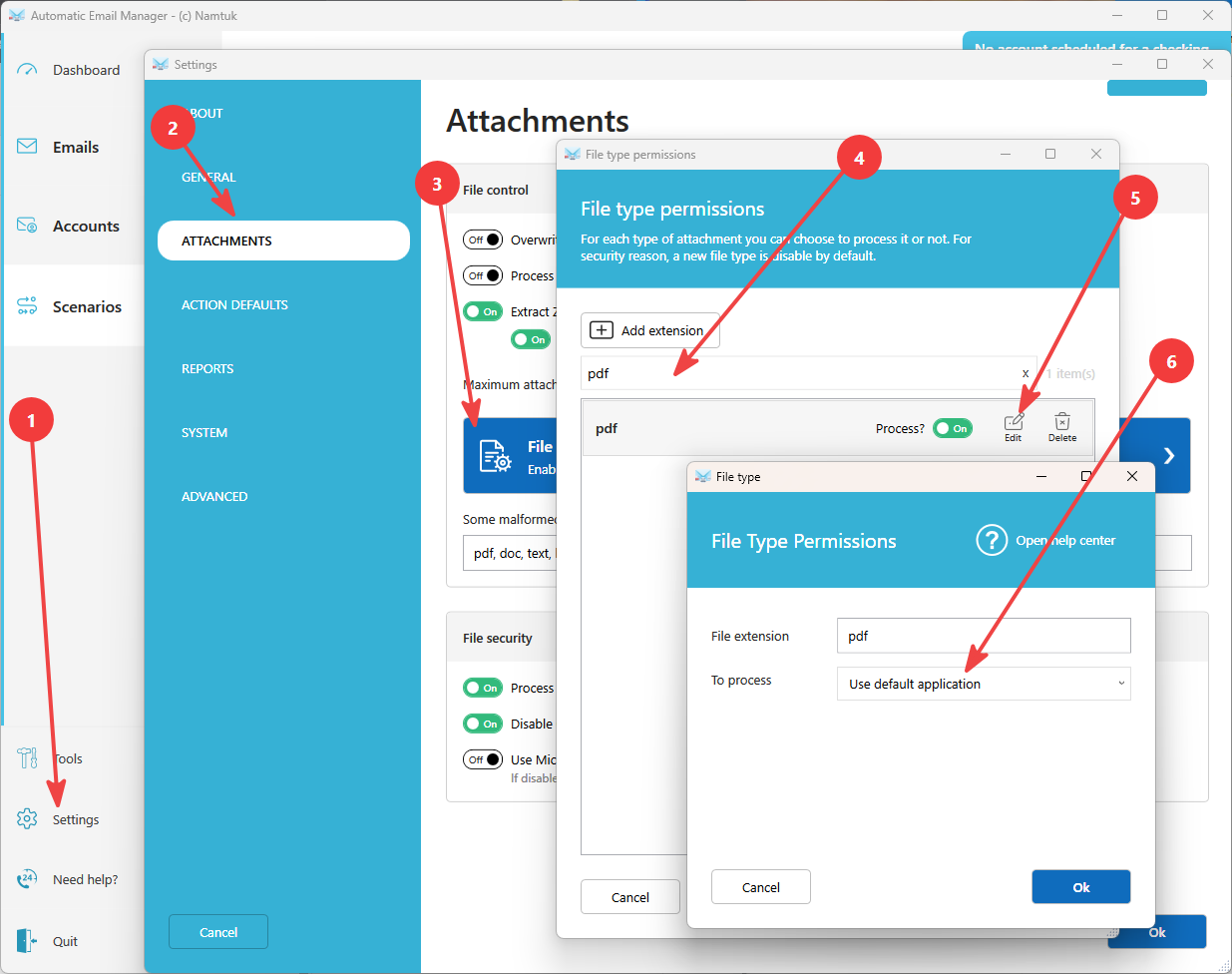
Let Automatic Email Manager use the PDF reader installed on your computer, such as Adobe Acrobat Reader or Foxit Reader.
- Install a PDF reader on the computer.
- In Automatic Email Manager, open Settings.
- Go to Attachments, then File types.
- Search for PDF, then click Edit.
- Select Use default application.
- Click OK to save.
Important: This solution works only when Automatic Email Manager runs in a Windows session. It doesn't work in service mode when no user is logged in.
Still having issues? Contact us and attach an example PDF.